How to make a BbY WOW AI video
Upload one front-facing photo to a BbY WOW generator, pick a style, and download the 9-second vertical MP4 — that is the whole method. No app, no editing, no dance skills. Details, free options and fixes below.
From $6.99 per video — one-time. No subscription.
No watermark
Clean MP4, yours to post.
Photos deleted in 24h
Your upload is not kept.
Refund if it fails
Failed generations are refunded.
Ready in ~3 minutes
No queue, no app.
What is the BbY WOW trend
A real party clip, not a dance challenge.


The source is a party recording: a man walks out of a dancing crowd, takes a bite of a small snack, stares into the camera, then turns back into the crowd. The footage circulated for a while, then blew up again when a song with the same name spread — and people started putting themselves into the clip with AI.
You will also see it called “dime dime baby” and “the BbY WOW guy”. Same clip, same move, different captions.
What app do you use
The honest answer: there is no official app or filter.
- Web generatorPhoto → clip in one step, no install
- General AI toolsPrompt the move yourself, more control
- No official filterAny app claiming “official” isn’t
The clip is made with AI person-swap tools. A dedicated generator (like this site) does it in one step: photo in, clip out. General AI video tools can approximate it with a written prompt — the move is described literally, and you iterate until the timing lands.
If a friend “used an app”, they almost certainly used a web generator in a browser. Nothing to install is the norm for this trend.
The three steps
From photo to posted clip in about three minutes.
Upload 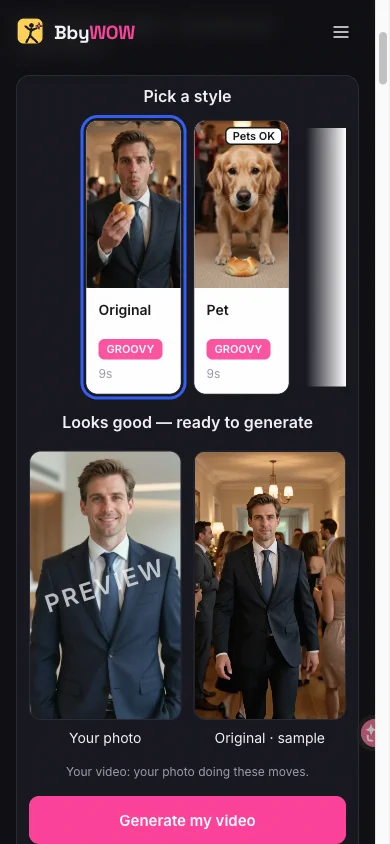
Pick a style 
Download
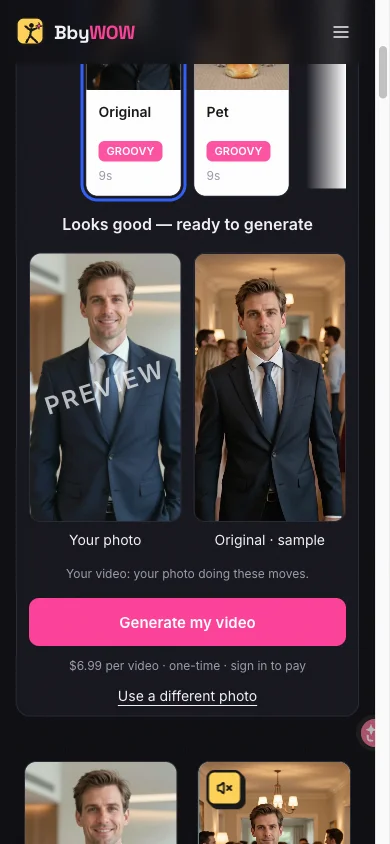
Step 1 — Upload a photo. One person or one pet, facing the camera, even light, head-to-waist or full body. The checker flags photos that will fail before you pay.
Step 2 — Pick a style. Original keeps your outfit. Cowboy adds western gear. Pet puts your cat or dog in the walk instead.
Step 3 — Generate and download. Sign in, spend 10 credits from a pack (from $6.99), and the 720p MP4 arrives usually within 3 minutes — by email and in your library. Post it and add the trending sound in-app.
Which tool should you pick
Four realistic routes — pick by how much control you want.
| Route | Cost | Looks like the meme? | Best for |
|---|---|---|---|
| This site | 10 credits (from $6.99) per clip | Yes — fixed reference move | Anyone who wants the exact clip fast |
| General AI video tools | Free tier or credits | Sometimes — needs prompt iteration | People who already pay for a video model |
| Template/editing apps | Free–cheap | Close, often watermarked | Quick try-outs, lower quality bar |
| Film yourself | Free | A cover, not the clip | People who can actually do the move |
Ready-made prompts
For general video tools — paste, attach your photo, iterate.
The person in this photo walks out of a crowded house party toward the camera, takes a small bite of a snack, stares into the lens for a beat, then turns and walks back into the crowd. Static camera, 9:16.
Keep the face, hair and clothes exactly as in the photo. Warm party lighting, crowd slightly out of focus behind, deadpan expression throughout.
A cat trots out of the party crowd toward the camera, pauses, looks into the lens, then trots back. Static camera, warm light, 9:16.
Buy credits, make videos
One-time credit packs. No subscription, credits never expire, and failed videos are returned automatically.
One video
10 credits · 720p · 9 seconds · no watermark
Squad
$29.00
50 credits · ≈ 5 videos
$5.80 per video
Save 17%- 720p MP4 · no watermark
- Credits never expire
- Failed videos: credits returned
Crew
$99.00
350 credits · ≈ 35 videos
$2.83 per video
Save 60%- 720p MP4 · no watermark
- Credits never expire
- Failed videos: credits returned
Party
$199.00
900 credits · ≈ 90 videos
$2.21 per video
Save 68%- 720p MP4 · no watermark
- Credits never expire
- Failed videos: credits returned
Studio
$499.00
3000 credits · ≈ 300 videos
$1.66 per video
Save 76%- 720p MP4 · no watermark
- Credits never expire
- Failed videos: credits returned
How do I make a BbY WOW AI video?
Upload one front-facing photo to the generator on this page, pick a style, pay for the clip, and download the vertical MP4. Three steps, about three minutes.
Can I make one for free?
Uploading and previewing is free everywhere. A finished clip costs money because video generation burns real compute — here it costs 10 credits, with packs from $6.99. Free routes are prompting a free-tier video tool yourself (expect retries) or filming the move.
What photo works best?
One person facing the camera, head-to-waist or full body, even lighting, no sunglasses or anything covering the face. Pet versions want one clearly visible animal.
How long is the clip?
9 or 15 seconds, 9:16 vertical — sized for TikTok, Reels and Shorts.
Do I need to add the music myself?
Yes — the download has no original audio. Add the trending sound inside TikTok, Reels or Shorts when you post; that also keeps the clip on-trend for the algorithm.
Is it safe to upload my photo?
Your photo is used only for generation and deleted within 24 hours. Only upload photos of yourself or people who agreed — and label AI content when you post.
Your turn to walk out of the crowd.
Your photos stay yours. Photos are used only for generation and deleted within 24 hours. Finished videos stay downloadable for 30 days. Only upload photos of yourself or people who said yes.